Know what to reorder, and when
EZstock counts down the days of stock you have left from your own sales, suggests an order for each supplier and emails it as a PDF. Scan barcodes to count stock and receive deliveries. If you're leaving Stocky, one upload brings your suppliers and PO history over.
14-day free trial · No credit card required · Works with all Shopify plans
"This app has been a great replacement for Stocky. Support is helpful and faster to respond than any other app I've ever used."
Shopify App Store review, July 2026 · Read reviews on the App Store →
Shopify shows the count. EZstock shows the countdown: the days of stock you have left before the reorder is late.
Features
Built for merchants who run tight operations
Barcode Scanning
Count stock, build a PO and receive a delivery by scanning barcodes with a handheld scanner or your phone camera, so you never type SKUs by hand.
Supplier Management
Build your supplier database with contact info, lead times, and currencies. Link every product variant to a supplier in seconds.
Purchase Orders
Create, send, and track POs from draft to received. On the Growth plan, receiving a delivery updates your Shopify stock.
Demand Forecasting
Turn your sales velocity, measured across up to 365 days of orders, into a days-of-stock countdown. Know how long you have before lead time runs out.
Low Stock Dashboard
Real-time inventory sorted by urgency. One-click to create a PO for everything running low from a supplier.
PDF Purchase Orders
Generate professional PDF POs and email them straight to your suppliers, with no extra PDF tool.
Stock On Hand Report
See your full inventory value at cost and retail, broken down by supplier, with margin per product. Export it to CSV.
Answers in Sidekick
Ask Shopify Sidekick what to reorder, what's running low or what's on order. It answers from your EZstock data.
Bin Locations
Save the shelf each product goes on once. The receive screen shows it on every delivery, and a PO can be sorted in shelf order.
Simple By Design
Set up in under 5 minutes
Add your suppliers
Enter supplier name, email, lead time (days), and default currency. Takes 60 seconds.
Link your products
Connect your Shopify product variants to suppliers. Set reorder points based on your buffer preferences.
Let EZstock do the math
We calculate sales velocity and current stock to tell you exactly what to order and when, automatically.
See It In Action
Full walkthrough in 3 minutes
See It In Action
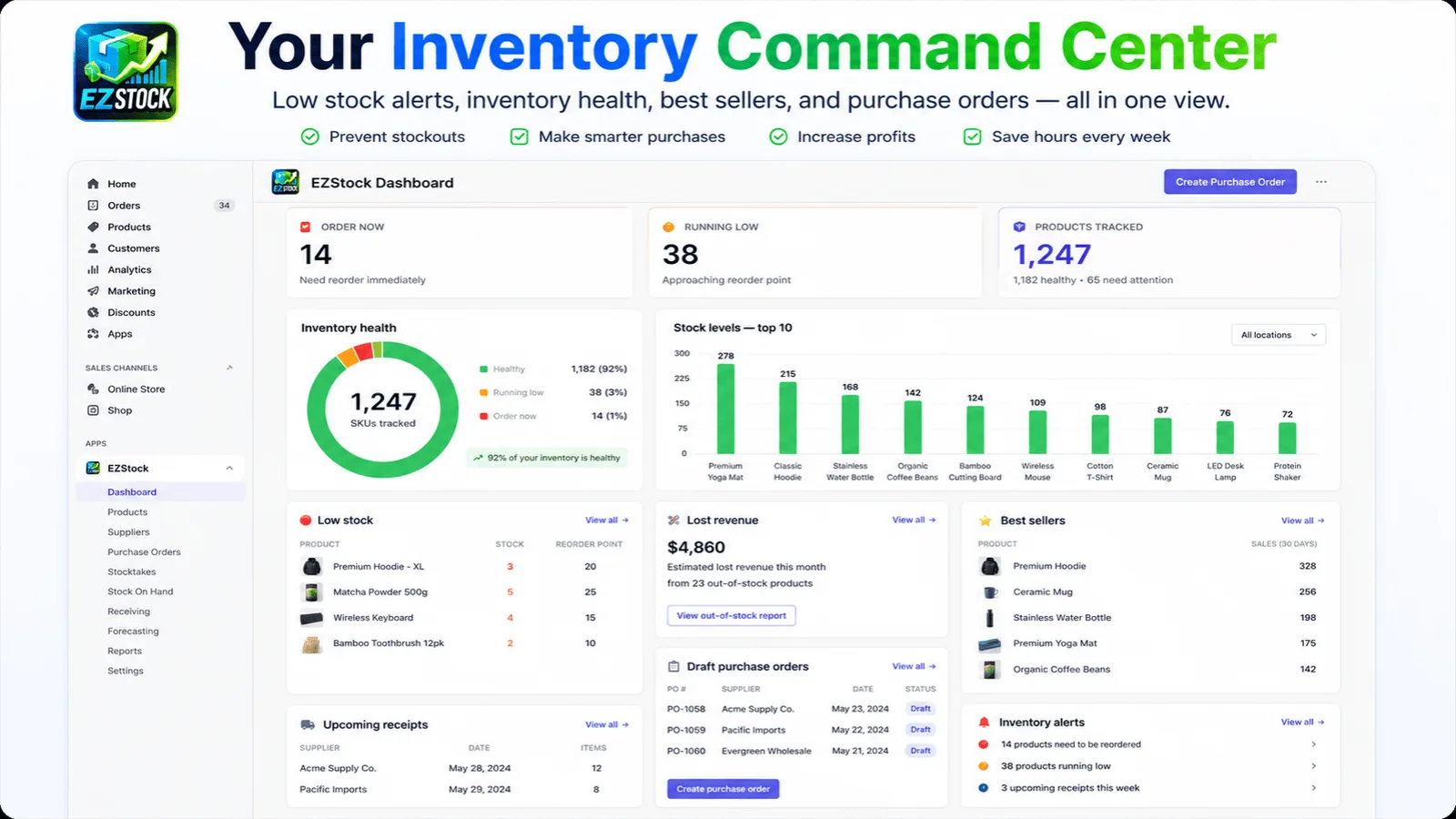
Every screen, exactly as it looks
Flat Monthly Fee
No per-PO fees. No surprises.
Start free, no credit card required. Every install gets 14 days of every feature, and paid plans add a 3-day free trial. Annual billing saves 17%.
Free
Start managing inventory at no cost
- Unlimited suppliers & products
- Up to 5 purchase orders per month
- PDF on every PO, 2 emailed a month
- Low-stock dashboard with reorder points
- On Order column on purchase orders
- Email support
- 14-day full-feature trial included
Starter
For active merchants who need unlimited POs
- Unlimited suppliers & products
- Unlimited purchase orders
- Email POs to suppliers (10 a month)
- Low-stock dashboard with reorder points
- Lost revenue panel
- Payment tracking
- Stocktakes with Shopify inventory sync
- 3-day free trial
Growth
Most popular, built for growing Shopify stores
- Everything in Starter
- Unlimited emailed POs
- Demand forecasting
- ABC product grading
- Inventory auto-update on receipt
- Stock On Hand & Sales History reports
- Barcode scanning (scanner or camera)
- Stock per location
- Bin locations when receiving
- Average cost when receiving
- POs drafted for you
- Amazon stock check (early access)
- 3-day free trial
Compare
How EZstock stacks up
| Tool | Free plan | Purchase orders from | Forecasting from | Free trial |
|---|---|---|---|---|
| EZstock | Free | $49/mo | 14 days | |
| Prediko(price by store revenue) | $49/mo | $49/mo | 14 days | |
| Assisty(price by Shopify plan) | $39/mo | $19/mo | 14 days | |
| Sumtracker | $119/mo | $119/mo | 14 days | |
| Ordoro | Shipping only | $499/mo | Not listed | 15 days |
Lowest monthly price with each feature, from each app's Shopify App Store page, October 2026. Prices can change.
FAQ
Common questions
What does Shopify's built-in inventory include?
Shopify tracks your stock at each location, and its own purchase orders let you record what you ordered from a supplier and receive it through a transfer. EZstock adds the planning: days of stock left from your own sales, a suggested order for each supplier, low-stock alerts, POs emailed to suppliers as PDFs, barcode scanning for stocktakes and receiving, and a one-upload move from Stocky.
Can I scan barcodes to count stock?
Yes. On the Growth plan you can scan barcodes with a USB or Bluetooth handheld scanner, or with your phone camera in the Shopify mobile app, to count stock during a stocktake, build a purchase order, and receive a shipment. EZstock matches by barcode with a SKU fallback, so you never type SKUs by hand. Barcode scanning is also included free during your 14-day trial.
What happened to Stocky?
Shopify closed Stocky, its free app for purchase orders and suppliers, on August 31, 2026. Shopify's own inventory tracking stays. Stocky's reports stay downloadable, read-only, for at least 90 days after that (around November 29; Shopify hasn't given an exact date), but suppliers can't be exported. EZstock's Move from Stocky page takes the purchase order report in one upload and rebuilds your suppliers, product links with costs, and PO history.
How does demand forecasting work?
EZstock works out how many units of each variant sell per day, from up to 365 days of your Shopify orders, and divides your stock by that to show the days you have left. Anything that will run out before its supplier's lead time is flagged first. The suggested order covers your coverage period (60 days by default): daily sales times the coverage days, minus the stock you have and the units already on order, plus your reorder point, rounded up to whole case packs if you set one.
Does marking a PO received update Shopify inventory?
On the Growth plan, yes. When you receive items, EZstock updates the quantity in Shopify at the location you pick, so you never adjust stock by hand. On Free and Starter, receiving records what arrived in EZstock. Every install gets the Growth behavior free during its 14-day trial.
Does EZstock work with Amazon?
Amazon stock check is in early access on the Growth plan. Connect your Amazon seller account and EZstock compares the quantities on the Amazon listings you ship yourself with your Shopify stock, and shows where Amazon lists more units than you can ship. It only compares: nothing changes on Amazon or Shopify. Email [email protected] and we'll turn it on for your store.
Is there a free plan?
Yes. EZstock has a free plan with unlimited suppliers and products, up to 5 purchase orders a month (2 of them emailed to suppliers) and PDF download on every PO. No credit card required. Paid plans add unlimited purchase orders and more supplier emails: 10 a month on Starter, unlimited on Growth, which also adds demand forecasting, inventory updates on receipt and stock per location. Every install gets 14 days of every feature, and paid plans add a 3-day free trial before the first charge.
Learn
Inventory guides for Shopify merchants
Free resources to help you stop stockouts, manage suppliers, and forecast demand.
The Complete Guide to Shopify Purchase Orders
What belongs in a PO, how to track it from draft to received, and how to automate the whole process.
Demand Forecasting for Shopify: How to Never Stock Out
How to calculate sales velocity, apply lead time, and set reorder points that account for supplier delays.
How to Set Reorder Points in Shopify
The formula every merchant should know, plus how to adjust for seasonal peaks and supplier variability.
Safety Stock: How Much Buffer Inventory You Actually Need
Avoid overstocking while protecting against supplier delays. Includes the safety stock formula with examples.
Supplier Lead Times & MOQ: What Every Shopify Merchant Must Know
How to negotiate lead times, handle minimum order quantities, and build supplier redundancy.
The Best Stocky Alternatives for Shopify in 2026
Side-by-side comparison of every Stocky replacement: features, pricing, and who each one is best for.
Coming from Stocky?
Bring your whole setup over, not just your POs
Stocky still lets you download your purchase order report, read-only, until around November 29, but it can't export your supplier list. EZstock's Move from Stocky page rebuilds your suppliers with their lead times, which SKU comes from which supplier at what cost, and your PO history from that one report.
Step 1
Download the PO report from Stocky
Stocky's completed purchase order report stays downloadable, read-only, until around November 29. Save it first.
Step 2
Upload it once in EZstock
EZstock creates a supplier for each name in the report, links each product to the supplier you last ordered it from with its cost, and brings your old POs in as history. If the column names differ, you pick them. Nothing changes in Shopify.
Step 3
Add your supplier emails
One table asks for the emails Stocky couldn't export. Then send your first purchase order.
Move before the export closes
Stocky's read-only export ends around November 29. Bring your suppliers and POs into EZstock while you can still download them.
Install EZstock Free →14-day trial · All Shopify plans · Cancel any time
More from Extensions Market